You can't change the Household Account or Contact on a Recurring Donation with Closed Opportunities
Over time, and typically due to manually modifying records in Salesforce, a scenario can occur where the source platform issues information which is different to the contact or account assigned to your recurring donation.
In this scenario, MoveData will act on the data being issued by the source platform, which can result in a contact or account being matched or created which is different to the one assigned to your recurring donation. If your recurring donation has closed opportunities, this can trigger the You can't change the Household Account or Contact on a Recurring Donation that has Closed Opportunities error and the notification will fail to process into Salesforce.
Transcription
- The notification has failed due to a Salesforce validation rule
- We typically see this error when customers have modified Salesforce data so it is no longer in parity with the information issued by their source platform
- Looking through the logs, we see the integration is trying to replace the contact. This is due to differences between the existing Salesforce record and the data issued by the source platform
- In the source platform, the recurring donation is under Jill Tester
- In Salesforce, the recurring donation is under Joe Tester
- You can solve this by opening the contact in Salesforce
- Update the record so that Salesforce and source platform information is aligned
- Confirm the recurring donation is under your newly updated contact
- Go back to your failed notification and click Reprocess
- Observe that the notification is processed successfully
- Optionally, consider reviewing your duplicate and matching rules to ensure a match is produced in the first place
Other Possible Causes
Multiple “Same” Contacts detected by Duplicate Rules
The same error can also occur when the duplicate rules detect multiple contacts due to two or more of the same records being present. MoveData will use the first duplicate with the highest confidence rating as determined by Salesforce.
Transcript
- The notification has failed due to a Salesforce validation rule
- Open Execution #1
- Looking through the logs, we see the integration is trying to replace the contact. This is due to differences between the existing Salesforce record and the data issued by the source platform
- Open App Launcher and Select Contact Merge
- Click Search Contacts
- Search Contacts by Name
- Select the records you would like to merge and click Next
- Select the values you would like to retain and click Merge
- Go back to your failed notification and click Reprocess
- Observe that the notification is processed successfully
Different Contact or Organisation Account
The same error can also occur when the Account changes. For example:
- The account on your record is a household account and, based on the information supplied by the source platform, the account is updated to the supplied organisation account, or
- The account on your record is an organisation account and, based on the information supplied by the source platform, the account is updated to a different organisation account
In both scenarios, the You can't change the Household Account or Contact on a Recurring Donation that has Closed Opportunities error will produce due to the supplied account (001Mp0000071e4gIAA) being different to the existing account on the Recurring Donation record (001Mp0000077ZBxIAM).
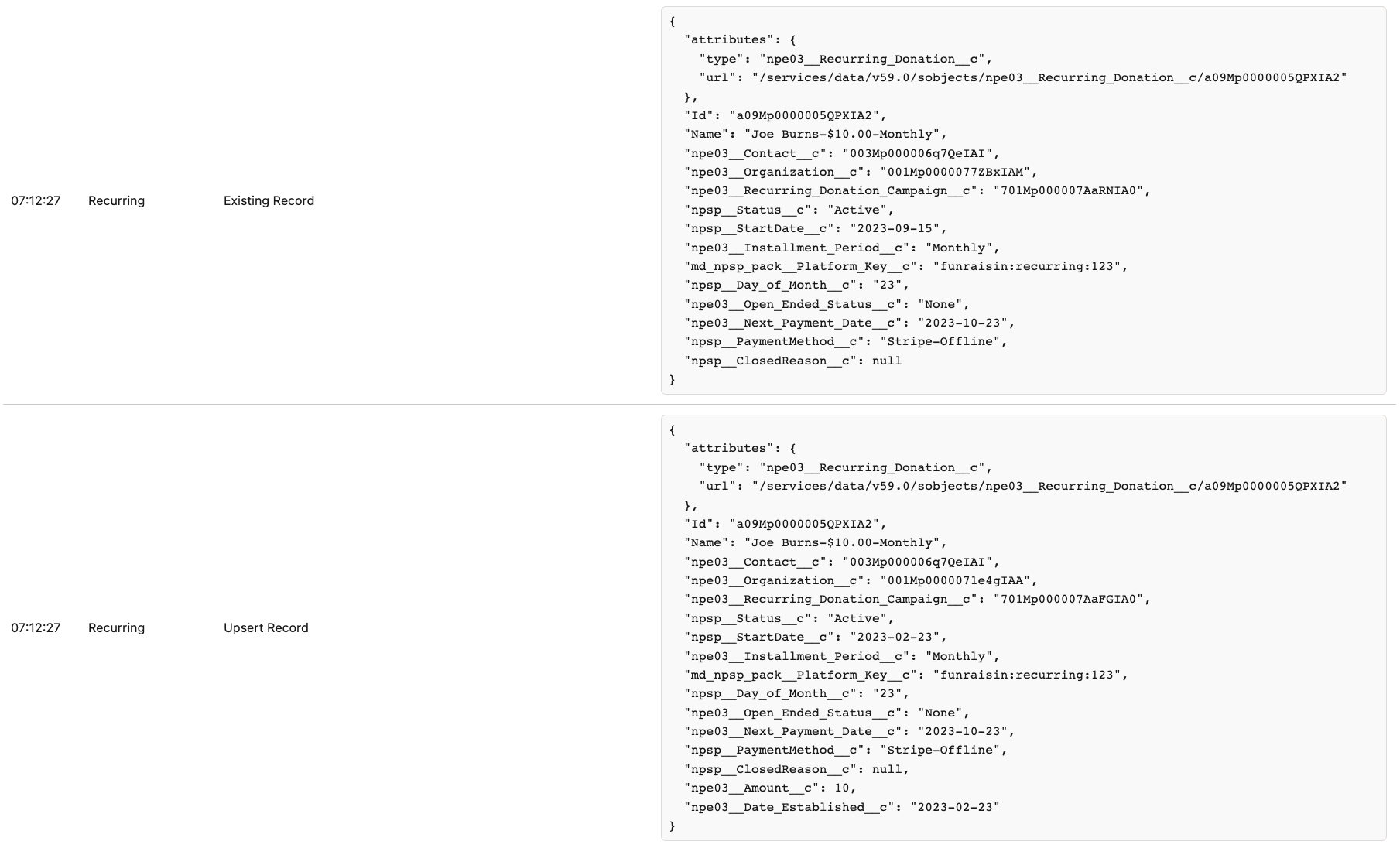
Remediation
To remediate this error:
- Ensure your duplicate rules are matching the same contact and/or account record as located on the recurring donation
- Ensure there are no duplicates records of the same contact or account
- Ensure the existing contact and/or account have the same key as present in the notification (see below)
- Update data on the desired record (either Salesforce or source platform) to ensure the duplicate detection returns a valid match
Matching to Existing Contacts and Accounts via Keys
You can also add mapping to match to existing Contact and Account records via Platform Key. To do this:
- Open the execution log for the failing notification
- Observe the generated platform key:

- Add
Platform Keyas a related list on your Contact Page Layout - Add the generated platform key to your existing contact:

MoveData will now match against your existing contact via key. Reprocessing the notification will cause MoveData to match to the originally assigned contact and therefore not trigger the You can't change the Household Account or Contact on a Recurring Donation that has Closed Opportunities error.